


Key Takeaways
- A consumer mailing list is either a compiled file (built from public records for broad targeting) or a response file (built from opt-in actions). Know which one you are buying.
- The value of a list depends on its available selects filters like geography, homeowner status, age, estimated income, and move date that let you narrow the audience.
- Consumer address data decays continuously as households move. A list that has not been processed against the National Change of Address (NCOA) database in the last 90 days will have a higher rate of undeliverable mail.
- Before mailing, you are responsible for running hygiene and suppression steps, including Coding Accuracy Support System (CASS) certification for address accuracy, merge-purge for deduplication, and suppression against Do Not Call (DNC) registries and internal do-not-mail files. You are also responsible for following local, state, and federal laws, and InfoFree is not liable for how you use the data.
- The quality of a list is set by its provenance how the records were sourced, compiled, and verified. Record count and price alone reveal none of that.
Every undeliverable piece of direct mail carries the full cost of print and postage. How many of those pieces a consumer file produces depends on factors a buyer can check before mailing: how the list was compiled, when the addresses were last verified, and what suppression files were run before delivery.
The quality of a consumer mailing list is set by its provenance how records are sourced, compiled, verified, and maintained. A buyer who does not understand the mechanics behind the data cannot evaluate what they are purchasing. This guide explains the process from the inside: how files are built, what targeting selects are available, why data freshness matters, what hygiene steps are required before you mail, and how specific verticals can apply these lists.
Compiled Files vs. Response Files: Two Different Products
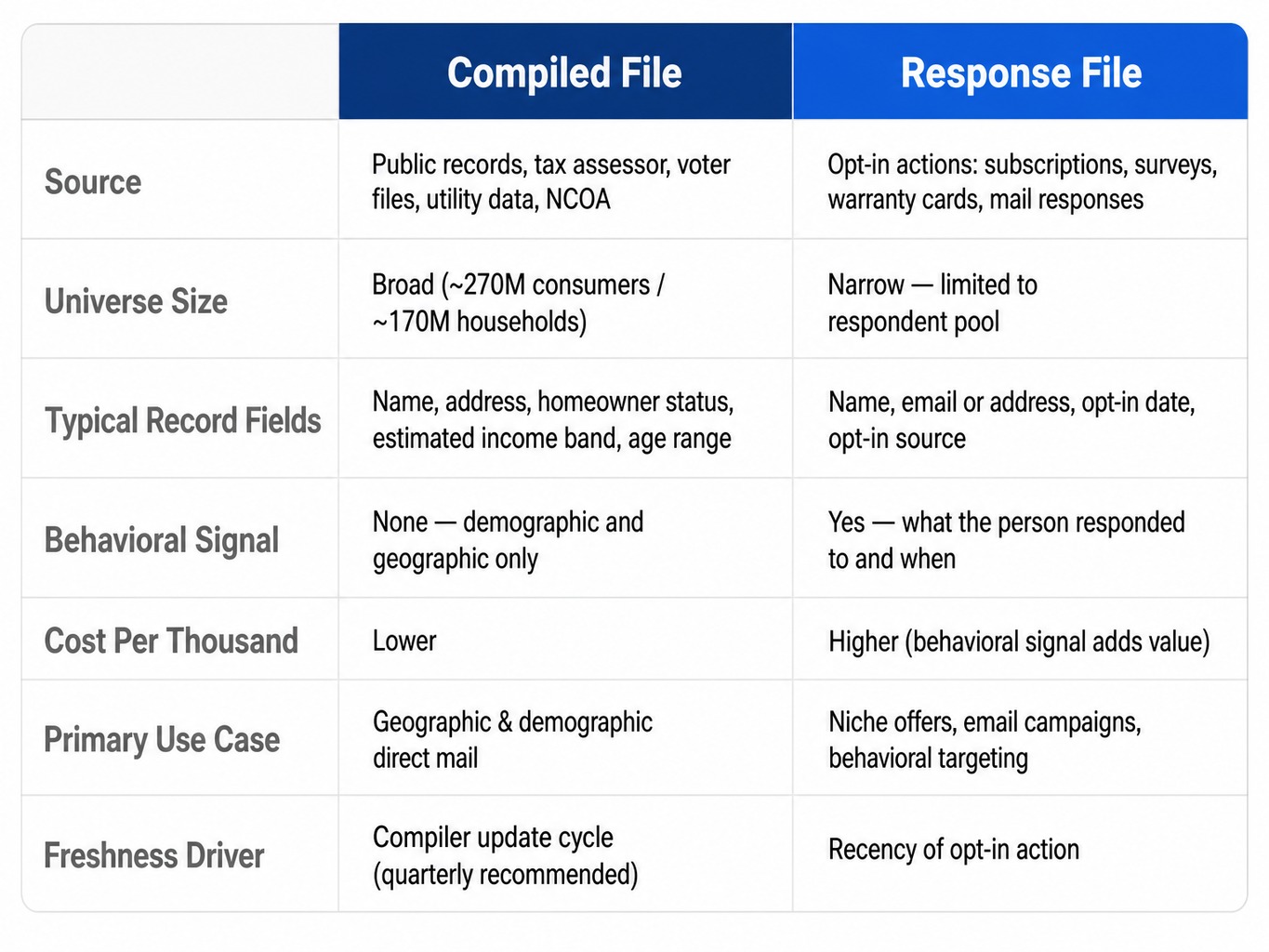
Every consumer mailing list is either a compiled file or a response file. The distinction determines what you can target, how fresh the data is, and what you should expect to pay. Compiled files are the foundation for broad-based geographic and demographic direct-mail campaigns, while response files are built from specific opt-in behaviors and carry different cost and recency characteristics. Understanding the difference is the first step in evaluating any list.
For example, a compiled record might contain a name, address, homeowner status, an estimated income band, and an age range. A response record for the same person might contain a name, email address, the date they opted in, and the source of the opt-in, like a specific online survey.
How Compiled Consumer Files Are Built
Compiled consumer files are assembled from a wide array of public and proprietary sources. An original data compiler aggregates and cross-references these inputs to build a master file of U.S. residents and households. Key sources include:
- Property deed and tax assessor records
- Utility connection data
- Voter registration files
- Postal service databases like the National Change of Address (NCOA)
- Licensed commercial data feeds from credit bureaus and other providers
The compiler then layers on demographic attributes, which are either observed or modeled. These include fields like age, estimated income, homeowner status, estimated home value, and household composition. At national scale, a compiled file covers roughly 270 million consumers or 170 million households. Compiled files prioritize comprehensive coverage and deep demographic filtering over behavioral recency.
How Response Files Differ
Response files, sometimes called hotline names, are built from individuals who took a specific action. They subscribed to a publication, filled out a product warranty card, responded to a direct-mail offer, or opted into a consumer email list. These records carry valuable behavioral context what the person responded to and when but they represent a much narrower universe than a compiled file.
Because the behavioral signal adds targeting value, response files typically cost more per thousand records. They are often used for niche offers or email campaigns where the context of the original opt-in is critical. A consumer email list built from subscribers to a specific newsletter is a response file, not a compiled file. The two should not be conflated when evaluating deliverability, compliance, or cost, as their sourcing and intended use cases are fundamentally different.
Demographic and Geographic Selects Available on Compiled Consumer Lists
The value of a compiled consumer list depends on which selects filtering criteria the compiler makes available and how granularly they can be applied. These filters allow you to narrow a vast universe of records into a targeted audience for a specific campaign. Not every provider offers the same depth, and the granularity of the selects is a primary way to evaluate a consumer database.
Primary select categories include:
- Geographic: State, county, ZIP code, postal carrier route, or a radius from a specific address.
- Demographic: Age band (e.g., 45-54), gender, and estimated individual or household income range.
- Household: Homeowner vs. renter status, estimated home value, length of residence, and household size. A record’s classification as a ‘consumer’ record (person-anchored with demographics) versus a ‘resident’ record (address-anchored, potentially without individual attributes) can affect the reliability of these filters.
- Life-Event: Triggers like new mover or new homeowner status, typically sourced from deed transfers and utility connection data.
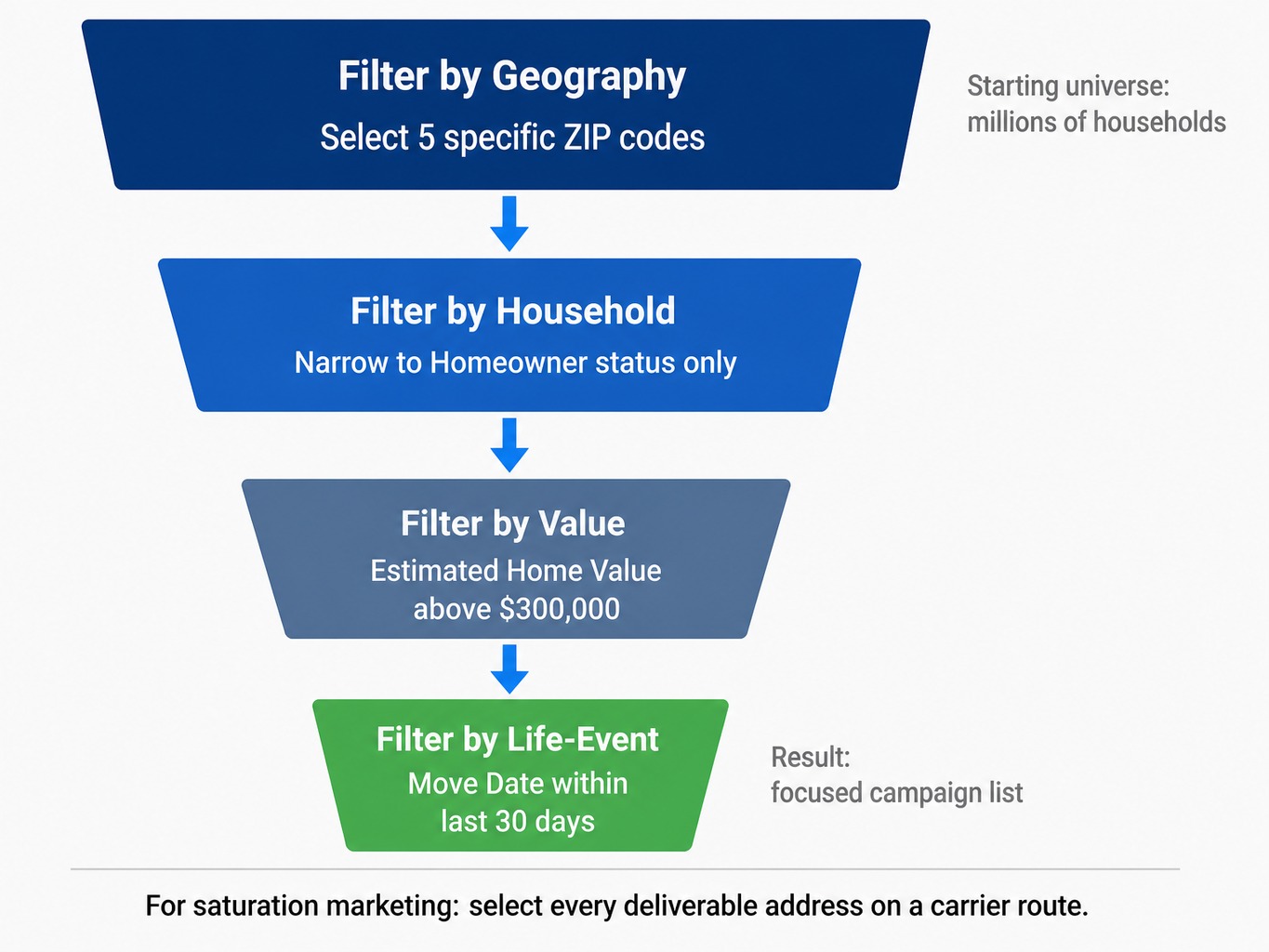
A typical layering sequence for a home-services campaign starts with a universe of millions of households and applies these filters:
- Filter by Geography: Select five specific ZIP codes.
- Filter by Household: Narrow to
Homeownerstatus only. - Filter by Value: Further narrow to an
Estimated Home Valueabove $300,000. - Filter by Life-Event: Focus on households with a
Move Datewithin the last 30 days.
Each filter reduces the count, turning a general audience into a narrower list that matches the campaign’s criteria. For broader campaigns aiming for full coverage, some platforms also support saturation marketing by selecting every deliverable address on a carrier route. An nth select, by contrast, pulls every nth record from a qualifying universe to produce a smaller sample of it.
How Consumer Mailing List Data Decays and When to Refresh
Consumer postal records degrade at a measurable rate. People move, names change, and households dissolve. According to the United States Postal Service (USPS), approximately 40 million Americans change addresses each year. This means a compiled consumer file that is not regularly processed against the NCOA (National Change of Address) database will accumulate undeliverable records over time, and the longer it goes without processing, the larger the undeliverable share becomes.
Each undeliverable record still carries the full cost of print and postage, so ask the provider when the file was last processed against NCOA before you mail.
NCOA processing matches records against the USPS change-of-address database to flag or update addresses for individuals who filed a move notice within the past 48 months. It is a minimum standard, not a complete fix; it only catches moves where the individual filed a forwarding request.
For repeatable direct-mail programs, the operating rule should be to refresh or re-pull consumer lists at least quarterly. For time-sensitive segments like new movers or new homeowners, refresh monthly. Mover segments are selected by move date, so a list pulled months earlier no longer reflects the window you filtered for.
Suppression, Hygiene, and Compliance Before You Mail
Buying a consumer mailing list is not the final step before printing. It is the step before hygiene, suppression, and compliance review. The data user not the data provider owns legal and financial responsibility for what happens next.
Here are the required pre-mail steps:
- CASS Certification: The Coding Accuracy Support System (CASS) is a USPS program that validates and standardizes addresses to delivery-point standards. Running a list through a CASS-certified process is required to qualify for postal presort discounts and is the first line of defense against undeliverable mail.
- NCOA Processing: If the provider has not already run the list through NCOA, this step is mandatory to catch recent moves and reduce waste.
- Merge-Purge: When combining records from multiple sources such as a subscription data platform, a purchased list, and an existing customer relationship management (CRM) export you must identify and remove duplicate contacts. Without a merge-purge process, duplicated households receive two identical mailers, doubling the print and postage cost for those records. Inserting
seed records(known test addresses) into the file helps verify that the merge was clean. - Suppression File Processing: Finally, you must suppress records that appear on your internal do-not-mail list and any applicable state-level suppression registries. For phone or email outreach, this extends to the Federal Trade Commission Do Not Call Registry, Telephone Consumer Protection Act (TCPA) obligations, and Controlling the Assault of Non-Solicited Pornography And Marketing (CAN-SPAM) Act requirements.
The provider compiles and delivers the file, but only the user decides which audiences to target, which offers to make, and which channels to use, and those choices determine which laws apply. That is why customers are responsible for following local, state, and federal laws when using purchased consumer data, and why InfoFree is not liable for how customers use the data.
Vertical Applications: Medical Offices, Coworking Spaces, and HVAC Services
While consumer mailing lists are commonly associated with insurance and home services, several underserved verticals can benefit from the same compiled consumer data. Each of these verticals requires a different combination of filters and decision-maker awareness.
Medical Offices
Medical and dental practices use consumer mailing lists to reach households within a defined geographic radius of the practice. They filter by age band, household income, and homeowner status to build a profile that matches their ideal patient base. The decision-maker for marketing is usually the practice owner or office manager. While patient data held by the practice is protected by the Health Insurance Portability and Accountability Act (HIPAA), prospecting data sourced from a compiled consumer file is not. Practices are still responsible for following local, state, and federal laws when using that prospecting data, and InfoFree is not liable for how they use it, so each practice should confirm its specific obligations with its own legal team. Physician offices are classified under Standard Industrial Classification code 8011 and North American Industry Classification System (NAICS) code 621111, and dental offices under codes 8021 and 621210. Practices typically buy prospecting data per campaign or through an annual data subscription.
Coworking Spaces
Coworking operators have a hybrid audience, targeting both businesses for team memberships and individual consumers for freelancer and remote-worker plans. For the consumer segment, compiled marketing lists can reach professionals within commuting distance. Filters for ZIP code, estimated income, and age band help identify likely members. These campaigns often use the mailing list as the first touch in a multi-channel sequence that includes digital follow-up. Coworking operators can be classified under NAICS code 531120 (lessors of nonresidential buildings), and the decision-maker is usually the operator or community manager. Memberships run month-to-month or on annual team agreements. Outreach that moves to phone or email must follow DNC and state privacy rules.
HVAC Services
HVAC contractors use consumer mailing lists to reach homeowner households in defined service areas, especially for seasonal tune-up campaigns, replacement estimates, indoor air quality offers, and new mover outreach. Useful filters include ZIP code, radius targeting, homeowner status, estimated home value, length of residence, and move date. Plumbing, heating, and air-conditioning contractors are commonly classified under Standard Industrial Classification code 1711, and the decision-maker is usually the business owner or general manager. Campaigns are often structured around spring and fall service pushes, while customer relationships themselves tend to convert into annual maintenance agreements or one-time replacement jobs. When HVAC companies use exported records for mail, phone, or email outreach, customers are responsible for following local, state, and federal laws, and InfoFree is not liable for how they use the data.
How InfoFree Supports Consumer Mailing List Campaigns
The quality of a list depends on its provenance, the depth of its selects, and its freshness. InfoFree is an original data compiler that builds its consumer and household database in-house from thousands of sources. As the compiler, InfoFree answers questions about where a record came from and how it is maintained directly, rather than referring customers to a third-party source.
The platform’s consumer database references approximately 270 million consumers and 170 million households, with selects that include:
- Homeowner Status & Estimated Home Value
- Age, Income & Household Composition
- Geography (ZIP, County, Radius)
- Move Date for New Mover & New Homeowner campaigns
InfoFree plans include search and view access across its databases without per-lookup fees, so users can test and refine audience segments before exporting; export limits vary by plan. Quarterly or monthly re-pulls count against that export limit, so check the plan’s allowance against your refresh schedule.
For users who serve both business-to-business (B2B) and business-to-consumer (B2C) audiences, the same platform provides access to a separate database of business and executive records. It is important to note that consumer and household records are compiled from different sources and are not rated on the same 95% accuracy standard that applies to InfoFree’s triple-verified business data. When using any exported data, customers are responsible for following all applicable local, state, and federal laws, including DNC, TCPA, CAN-SPAM, and state privacy statutes. InfoFree provides the data; it is not liable for how customers use it.
Your List Is Not a Commodity
Provenance sets the ceiling on a list’s quality, and the hygiene and suppression discipline you apply before the file goes to print or outreach determines whether that ceiling is reached.
Buyers who understand compilation methods, targeting selects, data decay, and pre-mail compliance are better positioned to judge what a list will deliver than those who evaluate lists on price and record count alone. Before you mail, confirm how the file was sourced, when it was last CASS-certified and NCOA-processed, and which suppression steps were applied.
Frequently Asked Questions
1. What is the typical deliverability rate for a purchased consumer mailing list?
Postal deliverability on a compiled consumer file depends largely on how recently it was CASS-certified and NCOA-processed, so ask the provider when both steps were last run. Deliverability drops as the file ages without re-processing. Email deliverability on purchased consumer email lists varies more widely and depends on whether the addresses are opt-in and how recently they were validated.
2. Is it legal to buy a consumer email list?
Purchasing a consumer email list is legal in the United States, but the buyer is responsible for complying with local, state, and federal laws, including the CAN-SPAM Act, applicable state privacy laws, and any opt-in requirements, and InfoFree is not liable for how the buyer uses the records. Before emailing a purchased list, confirm that the records were collected with appropriate consent and that your sending practices meet federal and state requirements.
3. How do I deduplicate consumer records when combining lists from multiple sources?
Run a merge-purge process that matches records across files on name, address, and other available fields. The merge identifies duplicates; the purge removes or consolidates them into a single record. Insert seed records known test addresses into the merged file to verify that the deduplication was clean and that the final mailing reaches the intended universe without double-sends.
4. What are carrier route saturation mailings and when should I use them?
A carrier route saturation mailing targets every deliverable address on a USPS carrier route rather than selecting individual households by demographic filters. This approach qualifies for the lowest postal presort discount rates and works well for local businesses dental practices, restaurants, home services where geographic proximity matters more than demographic precision. The trade-off is less targeting control in exchange for lower per-piece cost.
5. How can insurance agents use consumer mailing lists to reach senior benefit prospects?
Filter a compiled consumer file by age band (typically 64–65 for Turning 65 (T65) campaigns or 65+ for Medicare Supplement), geographic area (ZIP codes or counties), and homeowner status. Pull the list close to the campaign date, as senior-benefit timing is sensitive to enrollment windows. Calling or mailing these prospects is subject to the DNC, TCPA, and state privacy obligations covered earlier in this guide. The agent is responsible for following local, state, and federal laws when contacting these prospects, and InfoFree is not liable for how the agent uses the data.
6. What download or export limits should I expect from a consumer data subscription platform?
Subscription platforms that advertise unlimited access typically mean unlimited search and view the ability to query the database and inspect records without per-lookup fees. Exports (downloading records for use in external mail, email, or calling programs) are usually governed by plan-level caps that vary by tier. Before subscribing, confirm the specific export allowance per month or year.