


Key Takeaways
- Define Your Selects First:* The performance of a purchased list depends entirely on the filters you apply. Use firmographic selects (Standard Industrial Classification (SIC) code, employee count) for business-to-business (B2B) lists and demographic selects (homeowner status, age) for business-to-consumer (B2C) lists.
- Compare Pricing Models:* Per-record pricing from a broker suits one-off campaigns. A flat-rate subscription is more economical for teams that need to build and refine lists for repeatable outreach programs.
- Verify Your Provider:* Ask about data provenance (original compiler vs. reseller), verification cadence (how often records are updated), and contract terms before you commit. A low per-record price does not offset the cost of mailing to records that are outdated or undeliverable.
- Compliance Is Your Responsibility:* The data provider sells you records; you are responsible for following local, state, and federal laws, including scrubbing records against the National Do Not Call Registry and complying with the federal CAN-SPAM Act (Controlling the Assault of Non-Solicited Pornography And Marketing Act) and state privacy laws. InfoFree is not liable for how you use the data.
- Plan Your Post-Purchase Workflow:* The work starts after you buy the list. Plan for merge-purge against your customer relationship management (CRM) system, suppression of do-not-contact records, and loading the final list into a system for trackable outreach.
Sourcing targeted contacts for a direct mail or email campaign starts with a search. Within minutes of searching, you find two different worlds: list brokers quoting a price per record, and platforms offering flat-rate access to search millions of records. Both models deliver the same underlying product prospecting data but the cost structure, refresh cadence, and workflow can fundamentally change your campaign economics.
Data quality matters as much as the pricing model. When a compiled list of medical offices includes practices that have closed or relocated, every undeliverable record still carries print and postage costs, and the effective cost per valid contact rises above the per-record price you were quoted.
This guide walks through what a mailing list actually contains, how to specify the right selects for B2B or B2C campaigns, how to compare pricing models, what to check before you trust a provider, and what to do after the records arrive. It’s a process for buying a list with fewer surprises in cost or data quality.
Compiled Lists vs. Response Lists: What You Are Actually Buying
Before evaluating providers, you need to understand the two primary categories of mailing lists. A compiled list and a response list are not just different in quality; they differ in what they represent. A compiled record confirms that an entity exists at an address, while a response record confirms that a person took a specific action.
Compiled Lists are built from thousands of public and proprietary sources business filings, property records, directory data, and utility connections. They represent a universe of contacts that match certain attributes (like being a homeowner or a business of a certain size) but have not taken a specific action to engage with you.
- Best for: Broad-based outreach where you define the audience by its characteristics.
- Example: Mailing every homeowner within a defined radius calls for a compiled consumer list filtered by homeowner status and geography. This approach reaching every qualifying household in an area is known as Saturation Marketing.
Response Lists are built from people who did something specific: subscribed to a magazine, donated to a cause, attended a trade show, or requested a catalog. These lists are smaller, more expensive per record, and carry an implied interest in a topic. They are also typically rented for one-time use rather than purchased outright.
- Best for: Niche campaigns where you need to reach people with a demonstrated interest.
- Example: Reaching the attendees of a specific trade show or conference means renting the response list from the event organizer.
When people search for how to buy a mailing list, they are usually looking for compiled data to build their own targeted audiences. That is what the rest of this article covers.
How to Define Your Selects Before You Buy
How precisely you define your selects before you place the order determines which records you end up paying for. Selects are the filters geography, industry, title, age, income, homeowner status that narrow a provider’s database down to the records you actually want. Vague selects produce a large, cheap list that wastes postage. Precise selects produce a smaller, higher-relevance list.
The available selects differ depending on whether you are buying from a business database or a consumer database.
B2B Selects: Firmographic Filters for Business and Executive Lists
For B2B prospecting, you need to specify firmographic filters to identify the right companies and decision-makers. Core B2B selects include:
- Geography: State, county, ZIP code, or radius
- Industry: SIC (Standard Industrial Classification) or NAICS (North American Industry Classification System) code
- Company Size: Employee count or annual revenue range
- Business Age: Years in business
- Executive Attributes: Title, role, or management level
On the industry side, reaching medical offices means filtering by SIC codes in the 8011-8099 range (offices of physicians, dentists, health practitioners) and combining that with geography and an employee-count minimum if you want to exclude solo practices. Coworking spaces are typically filed under SIC 6531 (Real Estate Agents and Managers) or NAICS 531120 (Lessors of Nonresidential Buildings), so confirm with the provider which codes those operators appear under. For electrical contractors, filter by SIC 1731 (Electrical Work) and combine it with your target geography. The right SIC code determines whether your count is made up of relevant records or a large set of irrelevant ones. Each vertical also operates under its own compliance requirements: medical offices handle patient information under HIPAA (the Health Insurance Portability and Accountability Act), coworking operators work within local zoning and building-occupancy codes, and electrical contractors work under state licensing requirements and electrical safety codes. Know which of those requirements your offer touches before you write the mailer.
Read more: Business to Business Leads List | Infofree
B2C Selects: Demographic and Household Filters for Consumer Lists
For B2C campaigns targeting individuals or households, you use demographic and household filters. Core B2C selects include:
- Geography: State, ZIP code, carrier route, or radius
- Demographics: Age band, gender, or estimated household income
- Household Data: Homeowner status, estimated home value, length of residence, or presence of children
- Trigger Events: Move date (for new movers)
Selects for a new-mover mailing list can combine homeowner status, a move date within the last 30 days, an estimated home value above a defined threshold, and a specific set of ZIP codes. These selects come from compiled sources like property records and deed transfers, not from the consumer opting in. Before committing to a purchase, always ask the provider for a “universe count” the estimated number of records that match your criteria.
Per-Record Pricing vs. Flat-Rate Subscription Access
Mailing list pricing generally falls into two models. The right one depends on how often you run campaigns and how many records you need.
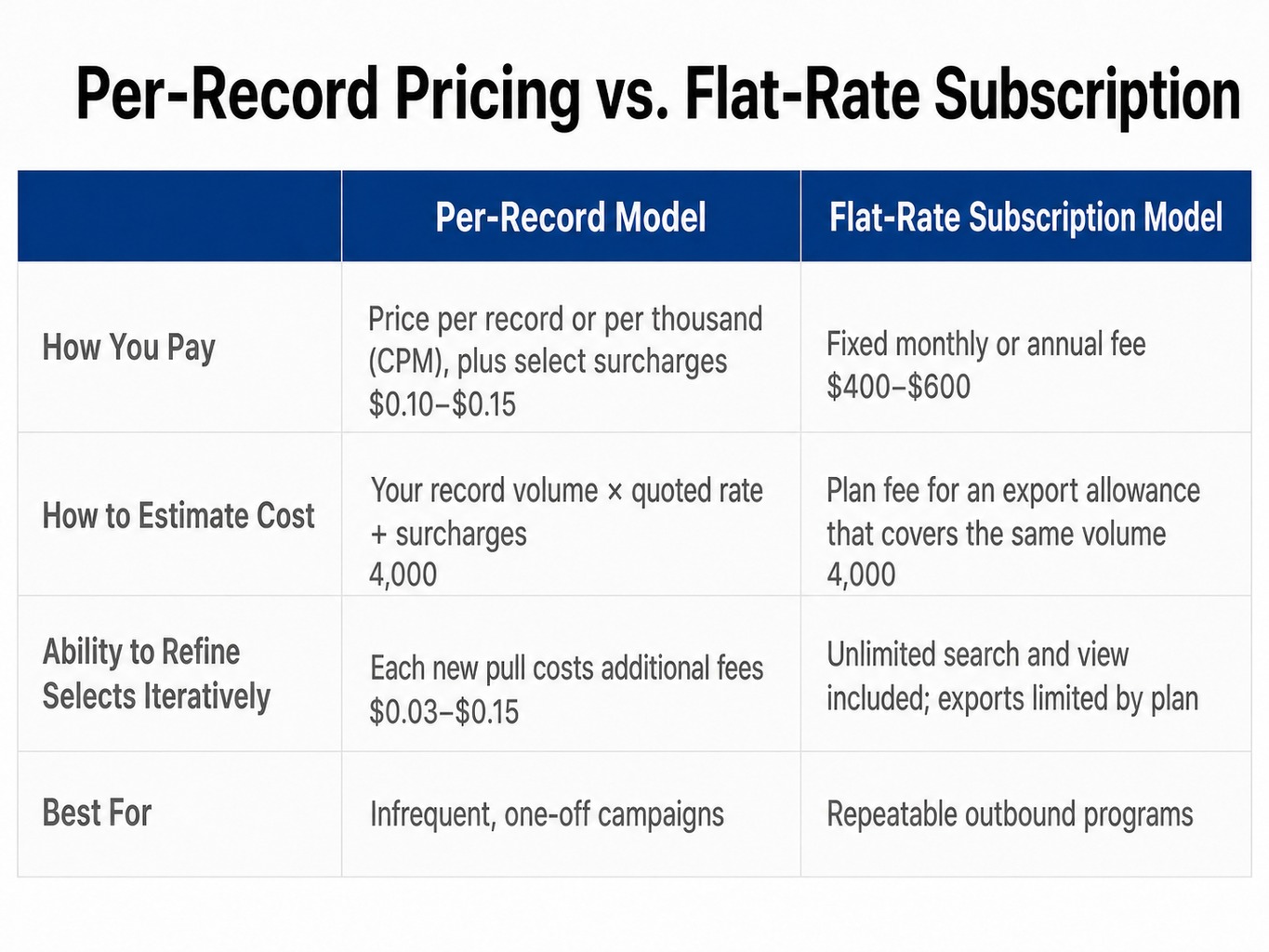
Model 1: Per-Record or CPM Pricing This is the classic model offered by list brokers. You pay per record or per thousand records (CPM, or cost per mille), with the base rate quoted for basic geographic selects. Each additional demographic or firmographic filter you apply may add a select surcharge. You get a one-time file, use it, and pay again for the next campaign. Before you plan a test, ask the broker for its minimum order quantity.
- Best for: Infrequent, one-off campaigns where you have a stable, well-defined audience.
Model 2: Flat-Rate Subscription Access This model, used by data platforms, involves a monthly or annual fee for access to a database. The fee typically includes unlimited search and view operations, allowing you to run as many filtered searches as you need to refine your audience. Exports are then governed by plan-level limits.
- Best for: Teams running repeatable outbound, direct mail, or calling programs who need fresh lists on a recurring basis.
To compare the two models, multiply your expected monthly record volume by the quoted per-record rate, add any select surcharges, and set that total against the fixed fee for a flat-rate plan whose export allowance covers the same volume.
Read more: ZIP Code Mailing Lists – Buy Mailing Lists by ZIP Code from Infofree
What to Check Before You Trust a Mailing List Provider
The provider you buy from matters more than the price you pay. A low-priced list with a high share of undeliverable addresses can cost more per valid contact than an accurate list at a higher CPM. Before you commit, ask any provider these five questions.
Data Provenance: Are you a compiler or a reseller? An original compiler builds its database from primary sources and can speak to its verification methods. A reseller licenses data from another compiler and may have limited visibility into data quality.
Verification Cadence: How often are records updated? For business data, ask if records are phone-verified. For consumer data, ask if records are processed against the United States Postal Service (USPS) National Change of Address (NCOA) database and CASS (Coding Accuracy Support System) certified for deliverability.
Universe Count Transparency: Can you show me a count before I pay? A reputable provider can run your selects and give you an estimated count of matching records from their database. If they cannot, you are buying blind.
Contract and Renewal Terms: What am I agreeing to? Is the pricing per order, a monthly subscription, or an annual commitment? Does it auto-renew? What are the actual export or download limits? Get the number, not a vague description.
Seed Records: Can I test a sample? Ask if you can receive a small sample of “seed records” to test deliverability and data structure before committing to a full order.
Compliance Before You Mail, Call, or Email
Buying a mailing list is legal; using it without following applicable regulations is not. When you purchase a list, you not the provider are responsible for complying with local, state, and federal laws, and InfoFree is not liable for how you use the data.
Here are the three main obligation areas for campaigns using purchased data:
Phone Outreach: Before any calling campaign, you must scrub your list against the Federal Trade Commission’s Do Not Call (DNC) Registry. Check for state-level DNC lists as well. The Telephone Consumer Protection Act (TCPA) also governs the use of autodialers and prerecorded messages, with violations carrying steep per-call penalties.
Email Outreach: The CAN-SPAM Act requires commercial emails to include a valid physical postal address, a clear and conspicuous unsubscribe mechanism, and honest subject lines. Purchased email lists carry a high spam-complaint risk because recipients did not opt in to hear from you.
Direct Mail and Privacy Laws: Direct mail has fewer federal restrictions. However, state privacy laws (like those in California, Colorado, and others) may impose obligations around consumer data use and opt-out rights.
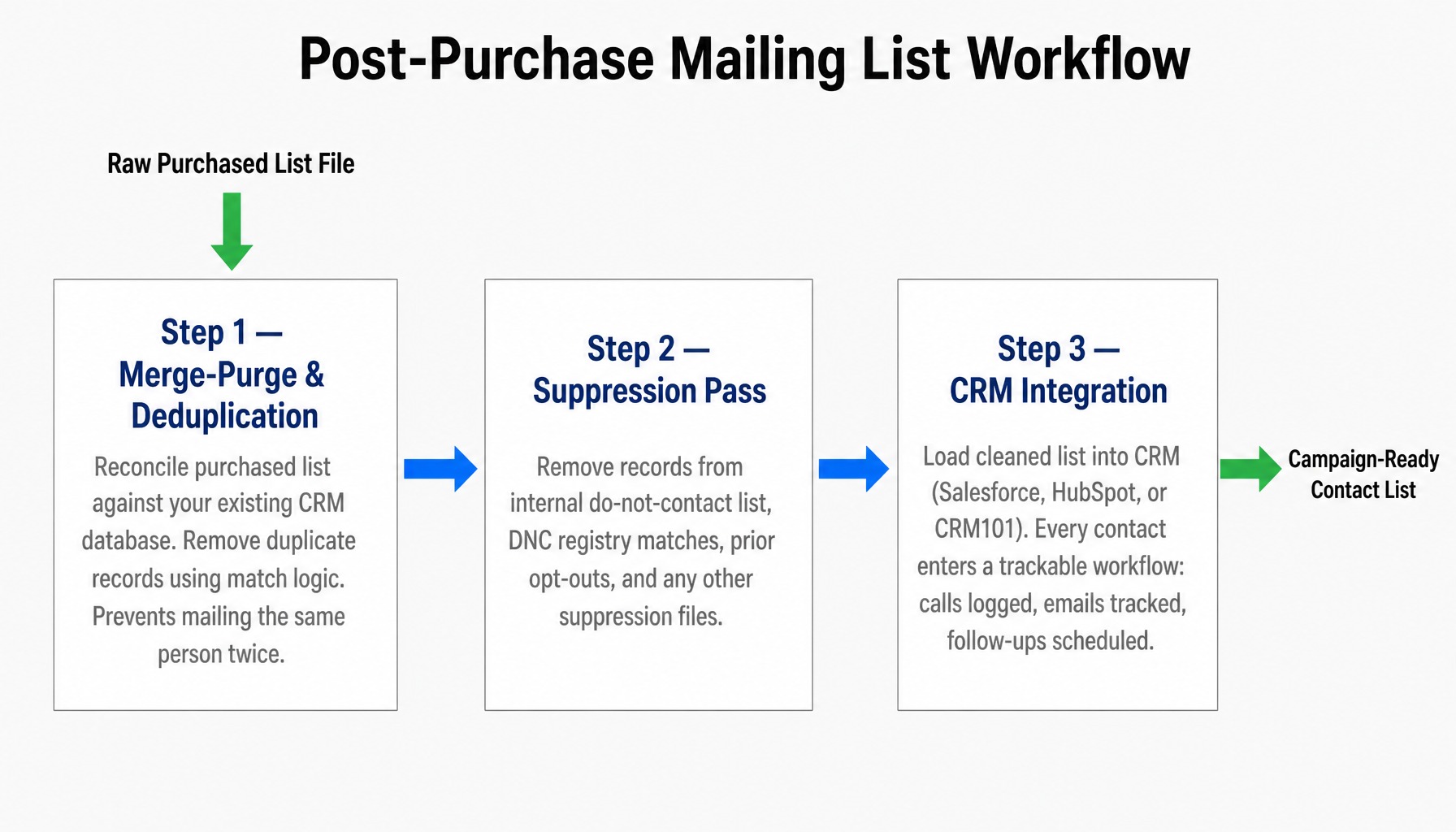
Before launching any campaign, run a suppression pass to remove records on your internal do-not-contact list, any prior opt-outs, and records flagged by DNC registries. This is a practical workflow step, not just legal boilerplate.
Post-Purchase Workflow: Merge-Purge, Suppression, and CRM Integration
Buying the list is the midpoint, not the finish line. The steps you take after receiving the file determine whether it performs or creates cleanup work.
Merge-Purge and Deduplication: If you are combining a purchased list with your existing house file (your CRM contacts), you must remove duplicates. While often used interchangeably, merge-purge is not the same as deduplication. Deduplication removes exact matches within a single file. Merge-purge reconciles a new file against an existing database using match logic to identify and remove overlapping records. Without this step, you might mail the same person twice, doubling your cost on that contact.
Suppression: Next, apply the suppression pass described in the compliance section above to the merged file, including any other suppression files you maintain. Running it after merge-purge means opt-outs are respected across both your house file and the new records.
CRM Integration: Finally, load the cleaned, deduplicated, and suppressed list into your CRM. Whether you use Salesforce, HubSpot, or an included tool like CRM101, this step is critical. It puts every contact into a trackable workflow where calls are logged, emails are tracked, and follow-ups are scheduled. Working from a spreadsheet leaves you with no visibility into which contacts responded or what follow-up is needed.
The list you buy is raw material. These post-purchase steps are what turn it into a usable campaign asset.
How InfoFree Handles the List-Buying Workflow in One Platform
Whether you buy from a broker or use a subscription platform, the workflow involves the same steps: define selects, pull records, run merge-purge and suppression, and load into a CRM for outreach. InfoFree brings these steps into one platform with flat-rate, unlimited search and view access, with export limits that vary by plan.
Instead of ordering from a broker, you can search InfoFree’s databases directly. This includes a business database of 22 million U.S. businesses and up to 70 million executives; InfoFree verifies business records three times and reports a 95% accuracy rating for them. It also includes a consumer database of approximately 270 million consumers and 170 million households. You can apply the same firmographic and demographic filters described in this guide SIC code, geography, employee count, homeowner status, and move date to define the audience you want to reach.
Because InfoFree is an original data compiler, not a reseller, you can get direct answers to questions about data provenance and verification. And with the included CRM101, you can move directly from building a list to managing calls, emails, and notes without exporting to another system.
When using any exported data, customers are responsible for following all applicable local, state, and federal laws, including DNC, TCPA, CAN-SPAM, and state privacy statutes. InfoFree provides the data; it is not liable for how customers use it.
Conclusion
Buying a mailing list is not a single transaction. It is a workflow that starts with defining precise selects, runs through a pricing-model decision, and only succeeds if the post-purchase steps merge-purge, suppression, compliance scrubbing, and CRM integration are completed before the first call is made or the first mailer is sent. Whether the list produces responses or wasted budget depends on how consistently you complete those steps.
Treat list acquisition as a repeatable process: refine selects after each campaign, refresh records on a regular cadence, and track every outreach attempt in a CRM. That record of activity is what shows you which selects and records produce responses.
Frequently Asked Questions
What is the difference between buying a mailing list and buying leads?
They are functionally the same product: prospecting data compiled from public and proprietary sources and filtered by selects you define. The label differs by vendor, with list brokers calling it a “mailing list” and some lead-generation companies calling it “leads.” Evaluate both on the same criteria: data provenance, verification method, freshness, and the cost per usable record after deduplication and suppression.
How many records should I expect when buying a mailing list for a single ZIP code?
It depends entirely on your selects. A residential compiled list for a single ZIP code with no demographic filters returns every household the provider has on file in that area, so the count varies with population density. Adding selects like homeowner status, an income above a certain threshold, or a specific age band narrows that count, sometimes substantially. Always ask the provider for a universe count with your specific filters applied before you order.
Can I buy a mailing list of medical offices filtered by specialty?
Yes. You can use SIC codes in the 8011-8099 range to target specific medical practices for example, SIC 8021 for dental offices or SIC 8042 for optometrists. Providers with granular SIC or NAICS filtering allow you to narrow your list by specialty, geography, and employee count. Confirm with the provider that their business database has sufficient coverage for the specialty codes you need before ordering.
What does data freshness mean when buying a mailing list?
Data freshness refers to how recently the records in the list were verified. A business record verified six months ago may belong to a company that has since moved or closed. Consumer records reflect address changes only as of their latest processing against the USPS NCOA database. Ask any provider how often they verify records and by what method phone verification, NCOA processing, or CASS certification.
Is it legal to buy an email list and send marketing emails to it?
Buying the list is legal. Sending to it is legal under the CAN-SPAM Act, provided you include a valid physical address, a clear unsubscribe link, and an honest subject line. However, purchased email lists carry a much higher spam-complaint risk because recipients did not opt in to hear from you. High complaint rates can damage your sender reputation and reduce deliverability for all your email campaigns. You are responsible for following local, state, and federal laws when you send to a purchased list, and InfoFree is not liable for how you use the data.
What SIC code should I use to find electrical contractors when buying a business mailing list?
Use SIC code 1731 (Electrical Work) to find electrical contractors. To confirm coverage, request a universe count under SIC 1731 filtered by your target geography before you commit to a purchase. Because this is a licensed trade in many states, make sure your offer and outreach language align with applicable state licensing requirements and electrical safety codes.