


Key Takeaways
- Define your Ideal Customer Profile (ICP) from your own closed-won deals before you ever touch a database. The patterns in your best customers are your best filters.
- Filter companies first (by industry, size, geography), then layer on role-based filters to find decision-makers. Use title clusters, not single job titles, to find the whole buying committee.
- Data quality starts at the source. Understand if your provider is an original compiler or an aggregator, as this determines the accuracy and freshness of the records you pull.
- A B2B list is not a static asset. Re-verify any list older than 90 days and run suppression checks against opt-outs and DNC lists before every campaign to protect your sender reputation.
- A clean handoff from list building to outreach is critical. Use tools with intact field mapping to preserve data integrity and ensure compliance obligations are met.
B2B teams treat list building as a sourcing problem. The logic is simple: find more contacts, buy more records, and scrape more profiles to fill the top of the funnel. The real failure point, however, isn’t a lack of data volume. It’s a lack of decision quality upstream. The list was built without a defensible Ideal Customer Profile (ICP), filtered on the wrong fields, or never verified before outreach.
Consider a five-person sales team that exports 10,000 contacts from a database. They load them into a sequence tool and watch the bounce rate climb past 8% within the first week. The problem wasn’t the database. The problem was that no one defined which companies and which roles belonged on the list before pulling the records. The list looked right in the platform. It fell apart on contact.
This guide walks through the B2B list building decisions that determine whether a list produces pipeline or just burns your sender reputation from ICP definition to filter selection, verification, and handoff.
Define Your ICP Before You Touch a Database
A productive B2B list starts with a clear definition of who you’re targeting, and the best source for that definition is your own closed-won data. Your Ideal Customer Profile is not a theoretical persona document; it is a set of filterable attributes derived from the accounts that already pay you.
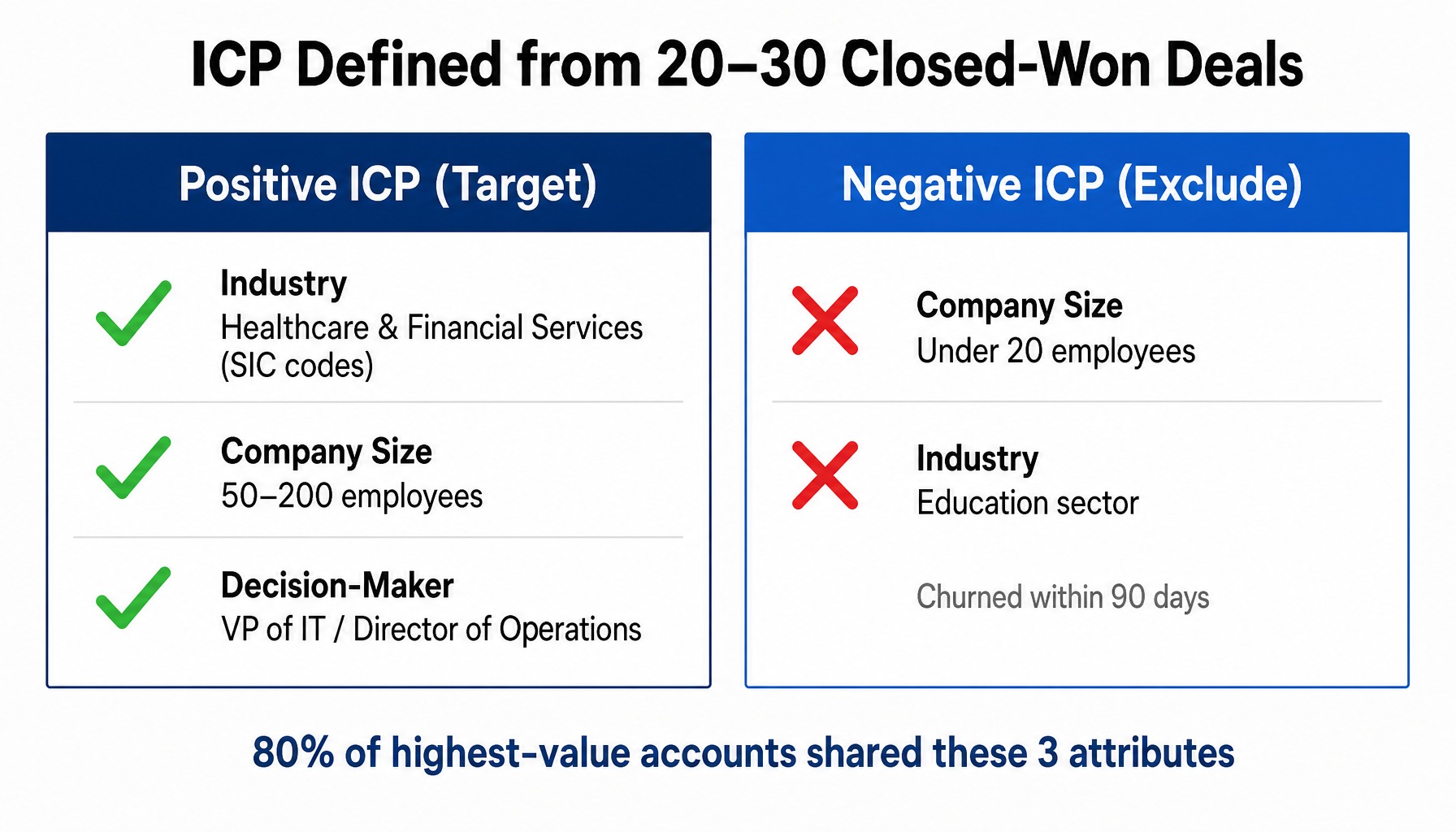
Before you run a single search, analyze your last 20–30 closed deals. Look for the patterns. For example, a regional IT services company might analyze its customer base and discover that 80% of its highest-value accounts share three attributes:
- Industry: Healthcare or financial services (specific SIC or NAICS codes)
- Company Size: 50–200 employees
- Decision-Maker: VP of IT or Director of Operations was the signer
That pattern, not a vague guess, becomes the positive ICP. This is the template for your search.
Just as important is the negative ICP: the attributes that correlate with lost deals, high churn, or unprofitable service cycles. In the same IT services example, the analysis might show that companies under 20 employees and those in the education sector consistently churned within 90 days. These attributes become exclusion criteria. You filter them out before you even begin.
Every minute spent on this analysis saves hours of wasted outreach. Start by extracting these core dimensions from your CRM:
- Industry: SIC or NAICS codes
- Employee Count: A specific range (e.g., 100–500)
- Revenue Band: An estimated range, if available
- Geography: State, metro area, or ZIP code list
- Decision-Maker Role: The job titles or functions that sign contracts
Choose the Right Firmographic and Role Filters
Filters are where your ICP logic becomes an actionable list. The quality of your output depends entirely on which filters you apply and in what combination. Teams typically either under-filter, pulling a universe of prospects that is too broad, or over-filter, shrinking the list below a usable volume.
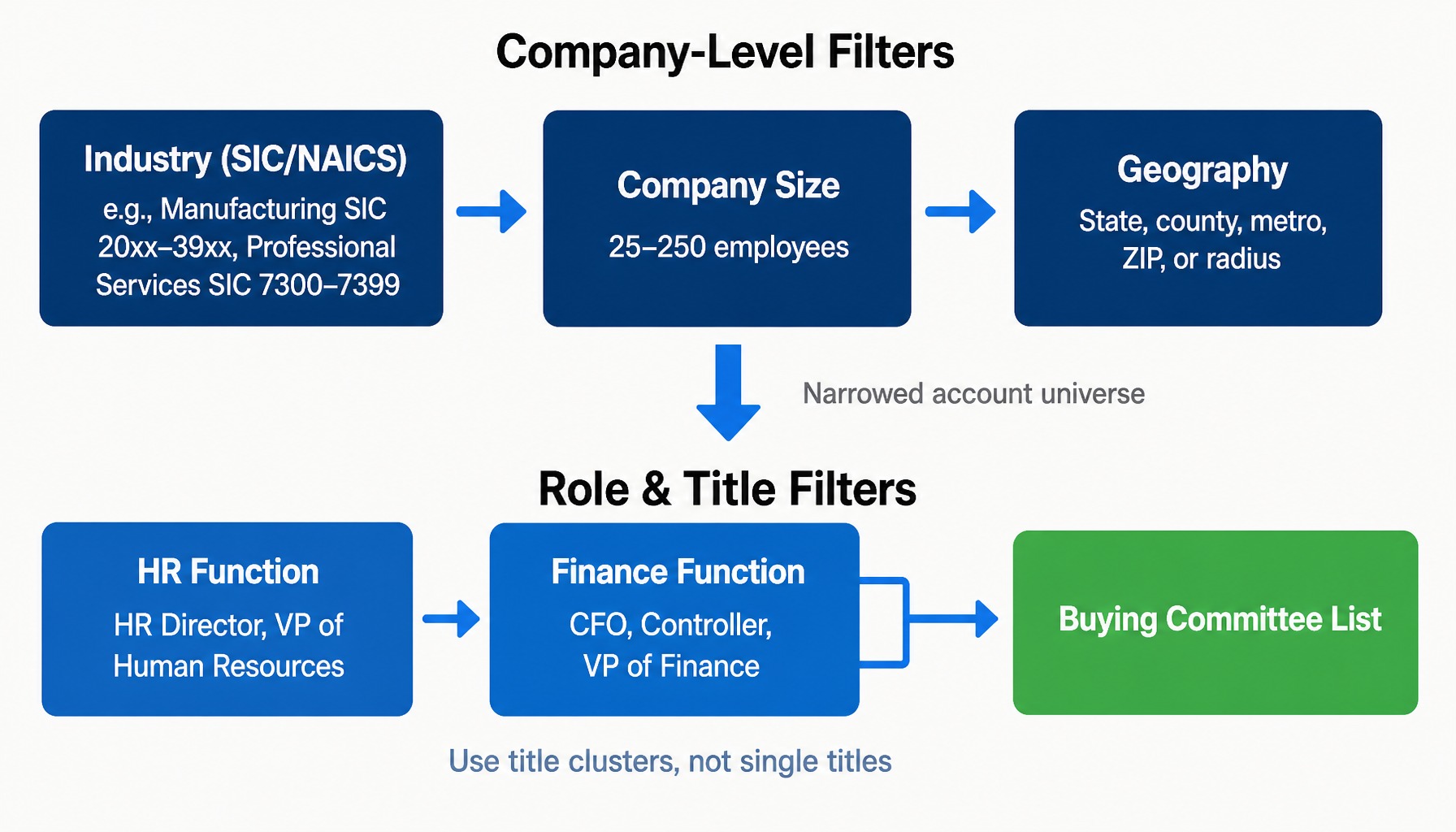
The process has two layers that work in sequence. First, use company-level filters to narrow the universe of target businesses. Second, layer on role-level filters to identify the people within those businesses who can actually make or influence a buying decision.
Company-Level Filters: Industry, Size, and Geography
These filters define your addressable market at the account level. The three most important are industry, size, and geography.
- Industry (SIC/NAICS): Using specific codes is more precise than broad categories. For example, an insurance agency targeting group benefits can use SIC codes to isolate manufacturing (SIC 20xx-39xx) and professional services (SIC 7300-7399) companies, excluding retail or construction. This tightens the focus on industries with known needs and budget cycles.
- Company Size (Employee Count): This is often the most reliable proxy for an organization’s complexity and budget. Revenue figures are frequently estimated or unavailable for private companies, making employee count a more stable field for segmentation. For our insurance agency, filtering for companies with 25–250 employees targets organizations large enough to need group benefits but small enough to lack a dedicated internal benefits manager.
- Geography: For field sales, local services, or territory-based teams, geographic filters are non-negotiable. You can define territories by state, county, metro area, ZIP code, or a radius search.
Role and Title Filters: Reaching the Decision-Maker
Once you have a universe of target companies, the next step is to find the right people inside them. An outbound campaign targeting the wrong person at the right company is a wasted touch. This is where filtering by job title and filtering by job function a fundamentally different operation comes into play.
Title filters match on string patterns, which can be too rigid. A search for “VP of Marketing” will miss the “Head of Growth,” “Director of Demand Gen,” and “CMO,” all of whom may be the right contact. It’s better to build title clusters that cover the entire buying committee.
Continuing our insurance agency example, the team knows that group benefits decisions typically involve both the HR function for plan selection and the finance function for budget approval. Therefore, they don’t just search for “HR Director.” They build a filter that includes titles like:
- HR Director
- VP of Human Resources
- CFO
- Controller
- VP of Finance
This approach acknowledges the reality of committee-based buying. The quality of executive data varies by source; compiled databases that verify titles through primary research tend to be more current than those relying solely on self-reported social media profiles.
Read more: Decision Maker Lists – Email, Phone and Mailing Lists from Infofree
Why Data Compilation Method Determines List Quality
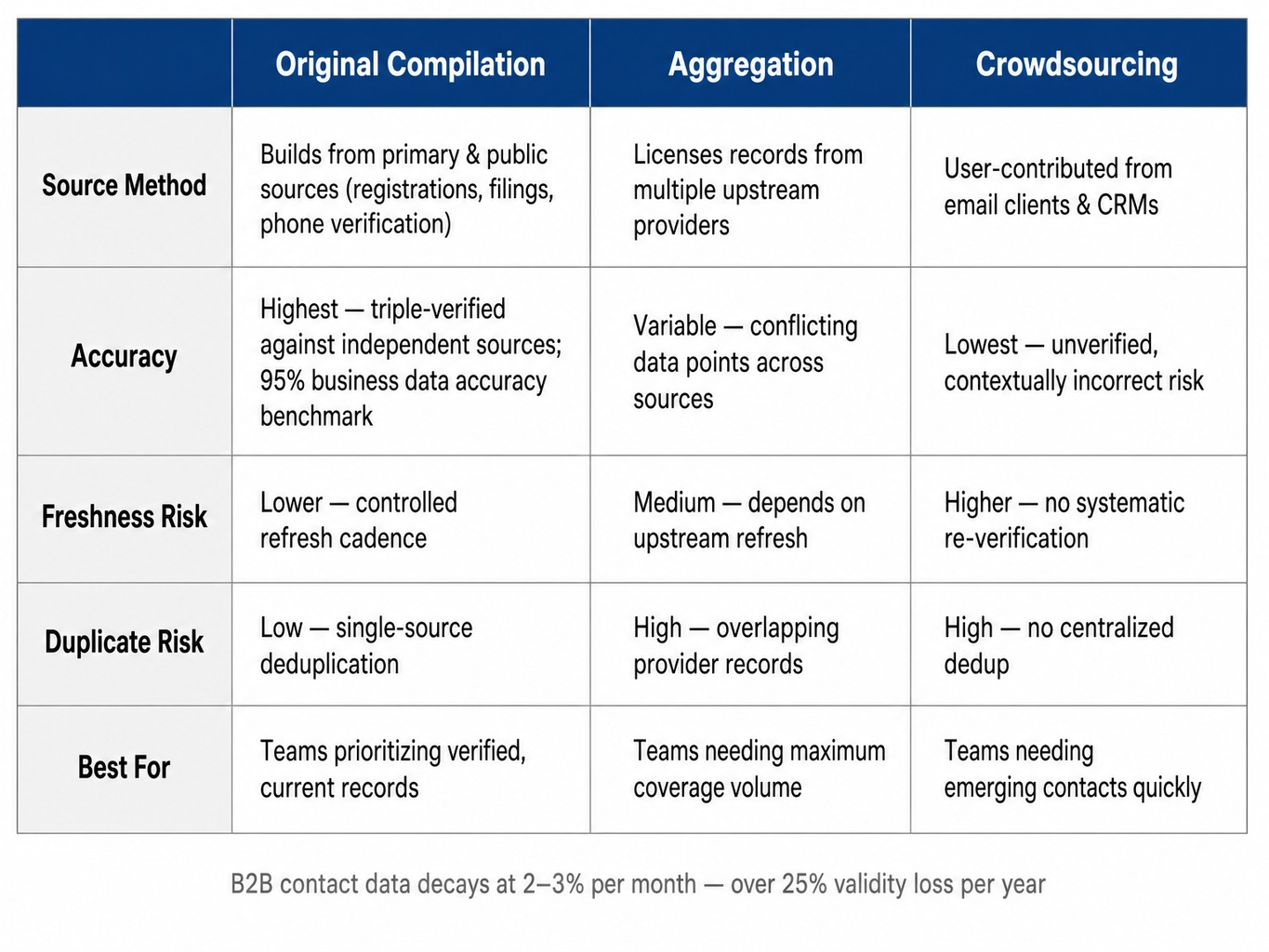
A frequently overlooked variable in B2B list building is where the records come from. The sourcing model directly impacts accuracy, freshness, and coverage. There are three broad types:
- Original Compilation: A data provider builds its own database from thousands of primary and public sources, such as business registrations, government filings, phone verification calls, and mail deliverability checks. These records are cross-referenced and verified in-house.
- Aggregation: A platform licenses records from multiple upstream data providers and layers them together. This can increase total record count but often introduces conflicting data points (e.g., two different titles for the same person) and duplicates.
- Crowdsourcing: Data is contributed by a community of users, often from their own email clients or CRMs. This model can capture emerging contacts quickly but carries significant risk of stale, unverified, or contextually incorrect information.
When a provider like InfoFree states it is an original compiler that triple-verifies its business records, it means each record is checked against multiple independent sources before being published. This process underpins claims like the 95% accuracy rate for business data. It’s crucial to note that such accuracy benchmarks typically apply to business data specifically and should not be assumed to cover all record types, like consumer or household data, which are compiled from different sources.
B2B contact data decays quickly. Industry benchmarks suggest a decay rate of 2-3% per month, meaning a list can lose over a quarter of its validity in a year. This makes the provider’s verification method and refresh cadence the primary levers of list quality.
List Hygiene: Verification Cadence and Suppression Management
Building a list is not a one-time event. A list that was highly accurate on the day it was pulled begins to decay immediately. Job changes, company closures, and domain migrations mean that without ongoing hygiene, you are actively damaging your sender reputation.
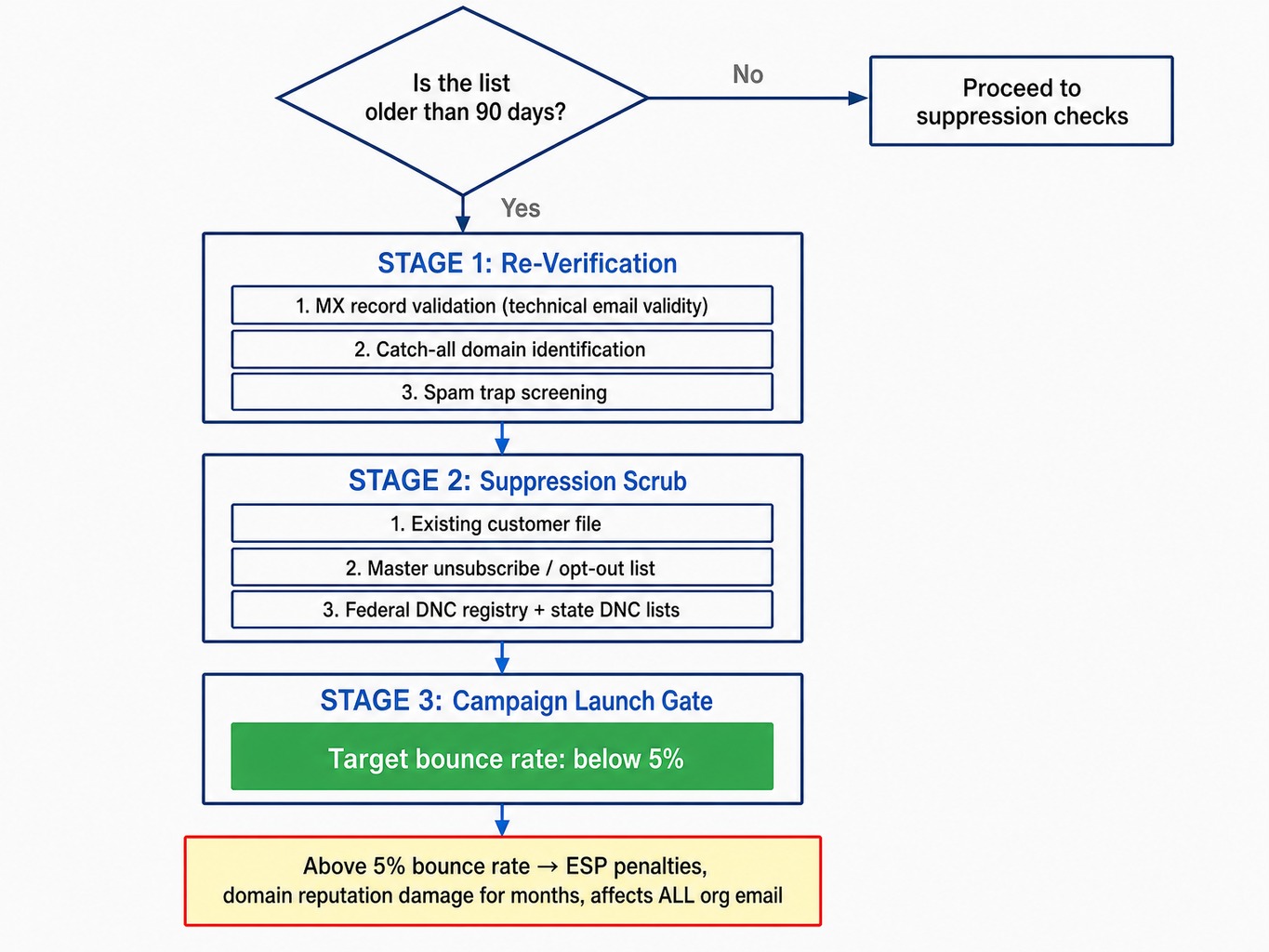
The operating rule is simple: any B2B list older than 90 days should be considered stale and re-verified before use in an outbound campaign. For email-heavy sequences, the standard is higher. The list should be run through an email verification service before every major send to check for technical validity (MX record validation), identify risky addresses (catch-all domains), and screen for known spam traps.
Equally important is suppression list management. Before you load any new list into a sequence tool or CRM, you must scrub it against:
- Your existing customer file.
- Your master unsubscribe and opt-out list.
- The federal Do Not Call (DNC) registry and any applicable state-level DNC lists if you plan to make calls.
Skipping this step has direct consequences. A bounce rate above 5% on a cold email campaign can trigger penalties from email service providers and damage your domain reputation for months, affecting deliverability for all email sent from your organization not just for that one campaign.
From List to First Touch: Outreach Handoff and Compliance
A perfectly built list can still fail if the handoff to the sales team is sloppy. When records are exported as a flat CSV, emailed to an SDR, and manually pasted into a sequence tool, errors are introduced at every step. Duplicates reappear, compliance flags are dropped, and data integrity is lost.
A clean handoff requires moving the list from the data platform directly into a CRM or sales engagement tool with field mapping intact. Key fields like company name, title, email, phone, data source, and the date the record was pulled must be preserved. This audit trail tells the team when a record was last verified and when it needs to be refreshed.
Then there is compliance. This is an operational requirement, not a legal footnote.
- Calling: Any outbound calling campaign must be scrubbed against the federal Do Not Call registry.
- Emailing: Campaigns must comply with CAN-SPAM in the U.S., which requires a valid physical address and a working unsubscribe link in every message.
- GDPR: If you are targeting contacts in the EU or UK, GDPR applies to B2B communications. While legitimate interest is a common legal basis for outreach, it is not an automatic pass and requires careful documentation.
Ultimately, compliance is the sender’s responsibility, not the data provider’s. A disciplined workflow that builds these checks in before the first touch is the only way to manage this risk effectively.
How InfoFree Supports This Workflow
The workflow described from ICP definition to compliant outreach often requires teams to stitch together multiple tools and data vendors. InfoFree is designed to connect these steps within a single platform built on a foundation of originally compiled data.
- ICP & Filtering: You can translate your ICP directly into search filters using InfoFree’s database of 22 million businesses and up to 70 million executives. Filter by SIC code, employee count, geography, estimated revenue, and executive title to build the precise company and role-based lists this workflow requires.
- Data Quality: As an original data compiler, InfoFree builds its business database in-house from thousands of sources and triple-verifies its business records, which are rated at 95% accuracy. This provides a strong starting point for list quality.
- Iteration & Cost: The platform’s flat-rate subscription includes unlimited search and view access, allowing your team to test and refine ICP filters without worrying about per-record costs. Export volumes are governed by your specific plan.
- Handoff to Outreach: With the included CRM101, you can move lists directly from search to a managed follow-up sequence, tracking calls, emails, and notes without the friction of exporting to a separate system.
When using any exported data, customers are responsible for following all applicable local, state, and federal laws, including DNC, TCPA, CAN-SPAM, and state privacy statutes. InfoFree provides the data; it is not liable for how customers use it.
Conclusion
Effective B2B list building is not a data-sourcing problem; it is a decision-quality problem. A list’s value is determined long before the first record is pulled by the ICP logic, filter specificity, and verification standards applied upstream.
The process is auditable and repeatable. Define your target from closed-won data, apply filters that match it, confirm the data was compiled and verified at the source, maintain hygiene on a 90-day cadence, and manage the handoff to outreach with compliance built in. Teams that treat list building as a discipline outperform those that treat it as a one-time purchase.
Frequently Asked Questions
Should I build separate B2B lists for email, calling, and direct mail?
Build one master list with complete contact fields, then segment it by channel availability. Not every record will have a verified email, a direct-dial phone number, and a mailable address. Segmenting by available contact method after the list is built rather than creating three separate lists from the start avoids duplicates and keeps your suppression and compliance tracking centralized.
How do I merge B2B prospect lists from multiple data providers without creating duplicates?
Deduplicate using a combination of normalized company name, website domain, and contact email. Matching on name alone creates both false positives and missed duplicates. Perform the merge in a spreadsheet or CRM before loading records into a sequence tool, and be sure to tag each record with its original source and pull date. This lets you track which provider delivers better results over time.
What is waterfall enrichment and when does it matter for B2B list building?
Waterfall enrichment routes a contact record through multiple data providers in sequence. If the first source can’t find a verified email, the record passes to a second source, then a third. It is most useful when your primary database has strong company data but gaps in direct-dial phone numbers or verified personal emails. The trade-off is added cost and complexity for each provider in the chain.
Can I use intent data to prioritize a B2B prospect list, and is it worth the cost?
Intent data, which signals that a company is actively researching topics related to your product, can help prioritize your outreach sequence. It works best for mid-market and enterprise sales where timing is critical and deal sizes justify the added data cost. For SMB-focused outbound with shorter cycles, the cost of intent data often exceeds the lift. Start with firmographic and trigger-based filtering before adding intent layers.